
The Problem: A Mountain of Breaking Changes
When PatternFly 6 was announced, I felt a familiar mixture of excitement and dread. Excitement for the new features and improvements. Dread for what lay ahead: migrating our flagship application, Konveyor Tackle2-UI, a React-based modernization platform with thousands of lines of code and hundreds of PatternFly component usages.
The PatternFly 6 upgrade guide made one thing clear: this wasn’t going to be a simple npm update. Component names changed. APIs evolved. Props were removed. Entire components were replaced with new patterns.
How do you even begin to inventory what needs to change across a large codebase? The traditional approaches all fell short:
- Manual code review - Too slow, too error-prone, and frankly, soul-crushing
- Find and replace - Dangerous for semantic changes and component-level refactoring
- Hand-writing static analysis rules - Time-consuming and requires deep expertise in both the framework changes and analyzer rule syntax
We needed a better way.
The Insight: Documentation Already Contains the Patterns
Here’s the thing: migration guides already document every breaking change. They show before/after code examples. They explain what changed and why. All that information is sitting there in structured documentation, waiting to be extracted.
What if we could feed that documentation to an LLM and have it automatically generate static analysis rules?
The Solution: From Documentation to Detection in Minutes
We built a tool that bridges the gap between migration documentation and automated static analysis:
# Step 1: Generate rules from official documentation
python scripts/generate_rules.py \
    --guide https://www.patternfly.org/get-started/upgrade/ \
    --source patternfly5 \
    --target patternfly6 \
    --output ./examples/output \
    --provider anthropic \
    --model claude-3-7-sonnet-latest

# Step 2: Run analysis on your codebase
kantra analyze \
    --input ~/tackle2-ui \
    --rules ./examples/output/patternfly5 \
    --output ./analysis-results \
    --source patternfly5 \
    --target patternfly6 \
    --provider java \
    --run-local \
    --overwrite
That’s it. Five minutes from documentation URL to a complete analysis of our codebase.

What Gets Generated
The tool doesn’t just create generic “search for this string” rules. It generates semantic, context-aware Konveyor analyzer rules with proper detection patterns, effort estimates, and helpful guidance.
Example 1: Component Renames
- ruleID: patternfly5-to-patternfly6-component-rename-00000
  description: import { Text } from '@patternfly/react-core' should be replaced
    with import { Content } from '@patternfly/react-core'
  effort: 3
  category: potential
  labels:
  - konveyor.io/source=patternfly5
  - konveyor.io/target=patternfly6
  when:
    builtin.filecontent:
      pattern: import.*Text.*from.*@patternfly/react-core
      filePattern: .*\.(ts|tsx|js|jsx)
  message: |
    The Text component has been renamed to Content in PatternFly 6

    Replace `import { Text } from '@patternfly/react-core'`
    with `import { Content } from '@patternfly/react-core'`.

    Before:
    ```
    import { Text } from '@patternfly/react-core'
    ```

    After:
    ```
    import { Content } from '@patternfly/react-core'
    ```
  links:
  - url: https://www.patternfly.org/get-started/upgrade
    title: PatternFly 6 Migration Guide
Example 2: Component Replacements
- ruleID: patternfly5-to-patternfly6-component-replacement-00000
  description: import { Chip } from '@patternfly/react-core' should be replaced
    with import { Label } from '@patternfly/react-core'
  effort: 3
  category: potential
  when:
    builtin.filecontent:
      pattern: import.*Chip.*from.*@patternfly/react-core
      filePattern: .*\.(ts|tsx|js|jsx)
  message: |
    The Chip component has been replaced with Label in PatternFly 6

    Replace `import { Chip } from '@patternfly/react-core'`
    with `import { Label } from '@patternfly/react-core'`.
Notice how each rule includes:
- Clear detection patterns that match actual code usage
- Effort estimates for prioritization
- Before/after examples so developers know exactly what to change
- Links to documentation for deeper context
- Specific file patterns to avoid false positives
How It Works
The workflow is surprisingly elegant:
-
LLM Extraction: Feed the migration guide to Claude, which extracts structured patterns—component renames, API changes, prop removals, etc.
-
Analyzer Rules: Generate Konveyor analyzer rules in YAML format with detection patterns, effort estimates, and remediation guidance.
-
Static Analysis: Kantra scans your codebase using the generated rules and identifies all violations with file locations and context.
-
AI Suggestions: Konveyor AI analyzes each violation and generates targeted fixes based on the migration patterns and surrounding code.
-
Review & Apply: Developers review AI suggestions, accepting, modifying, or manually fixing each issue to complete the migration.
Real Results
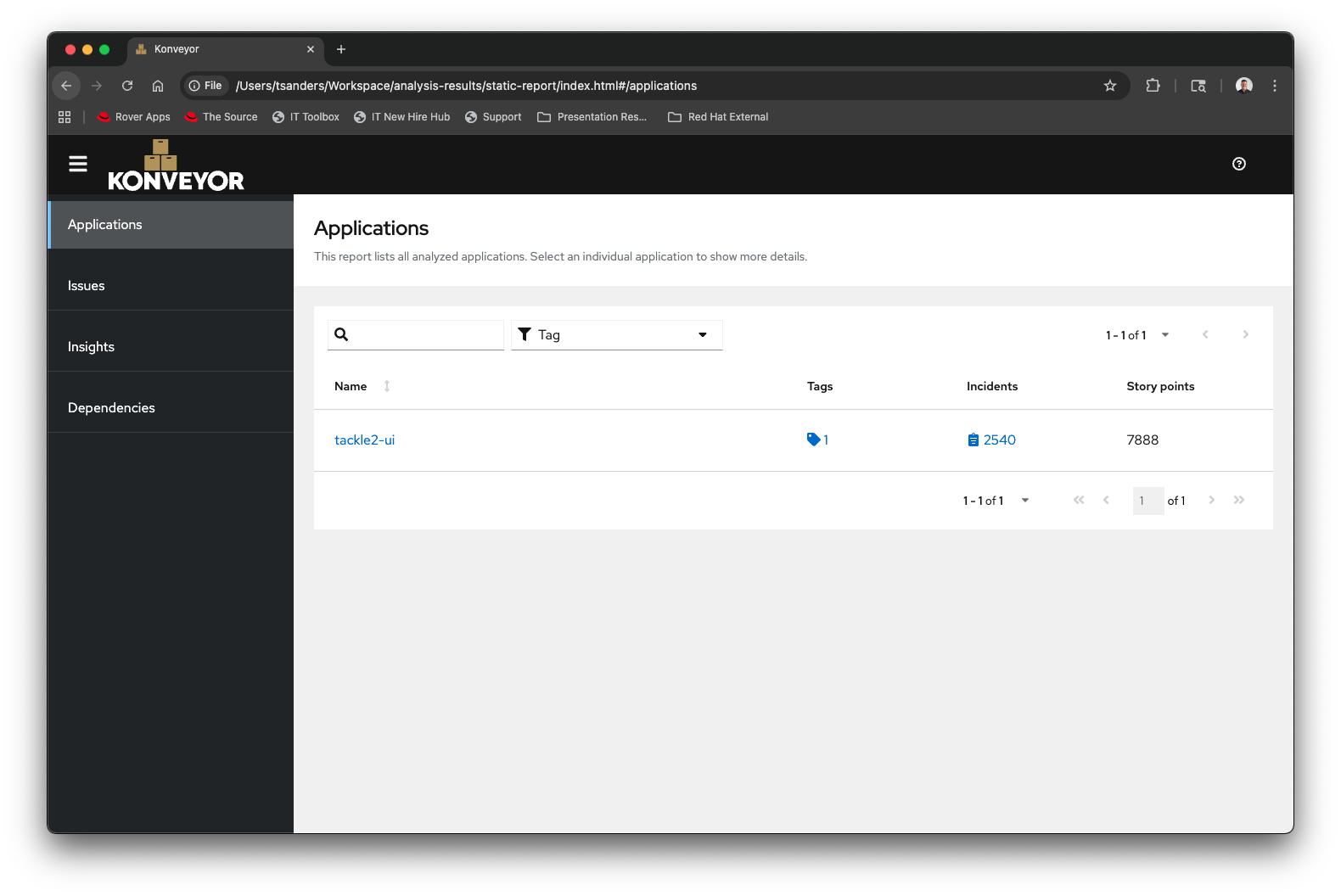
I ran this against the Konveyor Tackle2-UI application and here’s what we found:
Rule Generation:
  ✓ Extracted 15 patterns from migration guide
  ✓ Generated 15 rules across 8 concern areas
  ✓ Time: 2 minutes 14 seconds

Static Analysis:
  ✓ Scanned 2,847 files
  ✓ Found 2,540 violations across 125 files
  ✓ Analysis time: 8 seconds
What would have been days of manual code review became a 2-minute automated process.
From Detection to Resolution: AI-Assisted Fixing
Finding violations is just the first step. The real value comes from fixing them—and this is where Konveyor AI becomes a game-changer for developer productivity and cost savings.
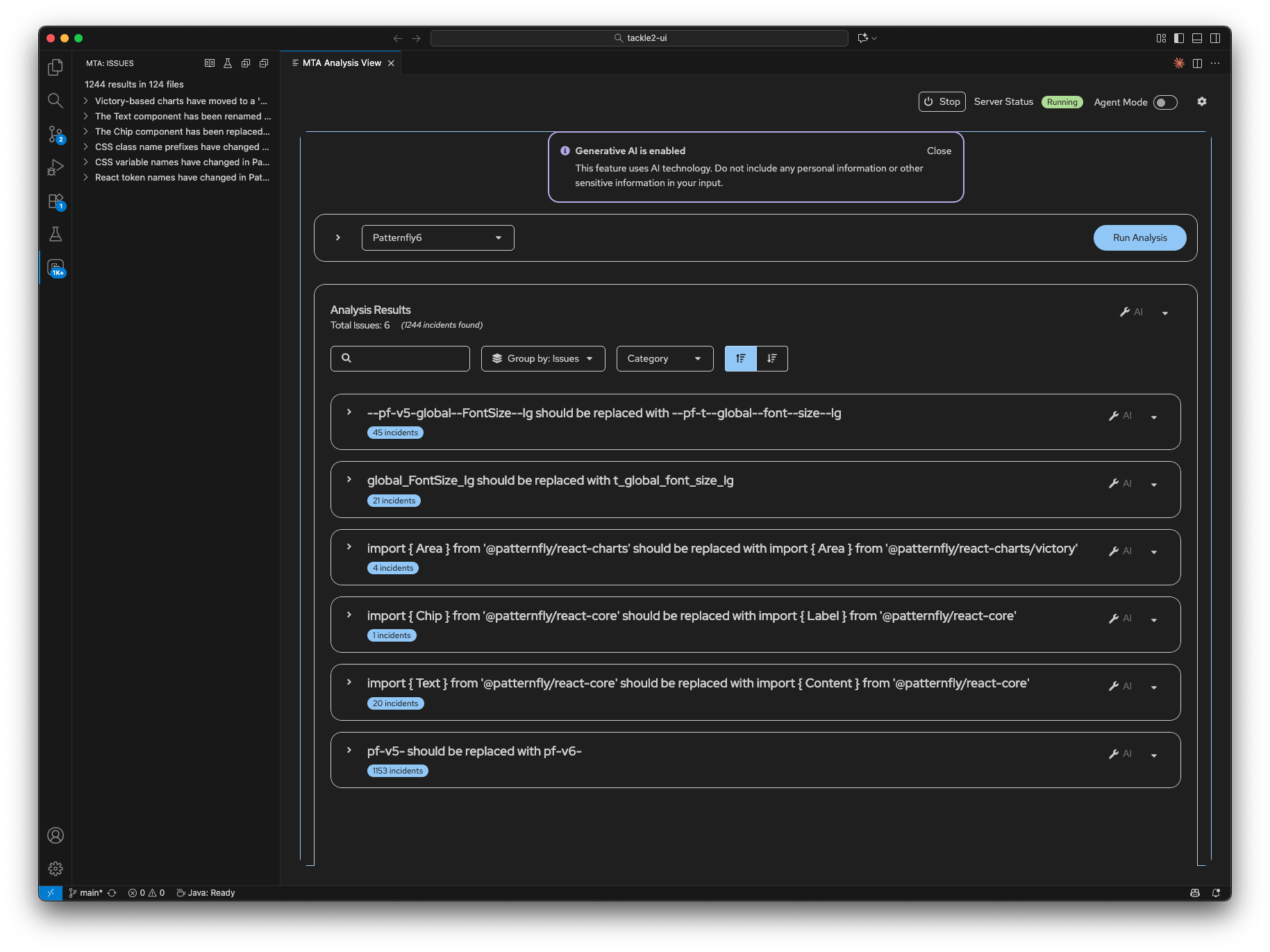
Once you’ve identified 2,540 violations across 125 files, you have two options:
Manual Approach: Developer opens each file, reads the violation message, consults the migration guide, understands the context, writes the fix, tests it. Multiply this by 2,540 violations. Even for experienced developers, this could easily consume weeks of focused work.
AI-Assisted Approach: Use Konveyor AI to analyze the violation in context and generate targeted fixes. The AI understands:
- The specific code pattern that needs to change
- The surrounding code context
- The migration guide recommendations
- Best practices for the target framework
Instead of days of tedious, manual refactoring, developers can:
- Review AI-suggested fixes
- Accept, modify, or reject each suggestion
- Focus their expertise on complex edge cases that truly require human judgment
This dramatically shifts how development teams spend their time. Rather than burning hours on mechanical code changes that are well-documented in migration guides, developers can focus on:
- Validating that fixes work correctly in their specific application context
- Handling complex refactoring that requires domain knowledge
- Testing and ensuring quality
- Solving novel problems that AI can’t handle
The cost savings are substantial. In our case, with over 2,500 violations across more than 100 files, what might require multiple developers working for weeks could potentially be reduced to a few days of review and validation. The ROI isn’t just in developer hours saved—it’s in faster time-to-market, reduced migration risk, and the ability to tackle migrations that might otherwise be deprioritized due to resource constraints.
Beyond PatternFly: This Works for Any Migration
While we focused on PatternFly 5→6, this approach works for any framework migration that has documentation:
- Spring Boot 2 → 3
- Angular 15 → 16
- React Router 5 → 6
- Your custom internal framework updates
The pattern is universal: Documentation → Patterns → Rules → Analysis
Try It Yourself
The tool is open source and ready to use:
# Clone the repository
git clone https://github.com/konveyor/analyzer-rule-generator
cd analyzer-rule-generator

# Install dependencies
pip install -r requirements.txt

# Generate rules for your migration
python scripts/generate_rules.py \
    --guide <your-migration-guide-url> \
    --source <source-framework> \
    --target <target-framework> \
    --provider anthropic

# Analyze your codebase
kantra analyze \
    --input /path/to/your/app \
    --rules ./examples/output/<framework> \
    --output ./analysis-results \
    --source <source> \
    --target <target> \
    --provider java \
    --run-local \
    --overwrite
The Bottom Line
Large-scale code migrations don’t have to be painful. By combining LLM intelligence with static analysis tools, we can:
- Automate pattern detection from documentation
- Generate accurate analysis rules without manual effort
- Find all migration issues in seconds instead of days
- Give developers actionable guidance with context and examples
What used to be a weeks-long, error-prone manual process is now a five-minute automated workflow.
The future of code migration is automated, intelligent, and developer-friendly. And it’s available today.
Want to learn more?
- GitHub: https://github.com/tsanders-rh/analyzer-rule-generator
- Konveyor Project: https://konveyor.io
- Try it on your codebase and let us know what you think!
Questions or feedback? Open an issue or discussion on GitHub - we’d love to hear about your migration challenges and how this tool could help.