
Series: Automating UI Migrations with Konveyor
- Part 1: Automating Large-Scale UI Migrations with AI-Generated Analyzer Rules
- Part 2: Improving Detection with Semantic Analysis (this post)
- Part 3: Automating Fixes with Konveyor AI (coming soon)
Introduction
The journey to AI-assisted migrations has three steps:
- Find the issues → AI-generated rules (Part 1)
- Find them accurately → Semantic analysis (Part 2 - this post)
- Fix them with AI assistance → AI-guided refactoring (Part 3)
In Part 1, we generated PatternFly v5→v6 migration rules from documentation using AI. It worked, but text-based pattern matching produced 15-20% false positives.
Why does accuracy matter? Because in Part 3, we’ll use Konveyor AI to assist with refactoring the violations. False positives waste AI tokens, produce incorrect suggestions, and erode trust in AI assistance.
Part 2 goal: Get violation accuracy to 95%+ so AI can confidently assist with fixes.
Results from tackle2-ui (66K lines):
- False positives: 20% → 5% (75% reduction)
- Manual review: ~320 violations → ~66 violations
- Time saved: ~5 hours of manual review
- Ready for AI assistance: ✅ High-confidence violations
| Jump to validation results → | Try the ruleset now → |
The Problem: False Positives Block Automation
Text-based pattern matching can’t distinguish between actual code references and text that happens to match:
Example: Finding a deprecated component
# Builtin provider - regex pattern matching
when:
  builtin.filecontent:
    pattern: "OldButton"
This matches:
- ✅
import { OldButton }(good) - ✅
<OldButton />(good) - ❌
// TODO: Update OldButton later(false positive - comment) - ❌
const myOldButton = 'something'(false positive - different variable) - ❌
"Check OldButton docs"(false positive - string)
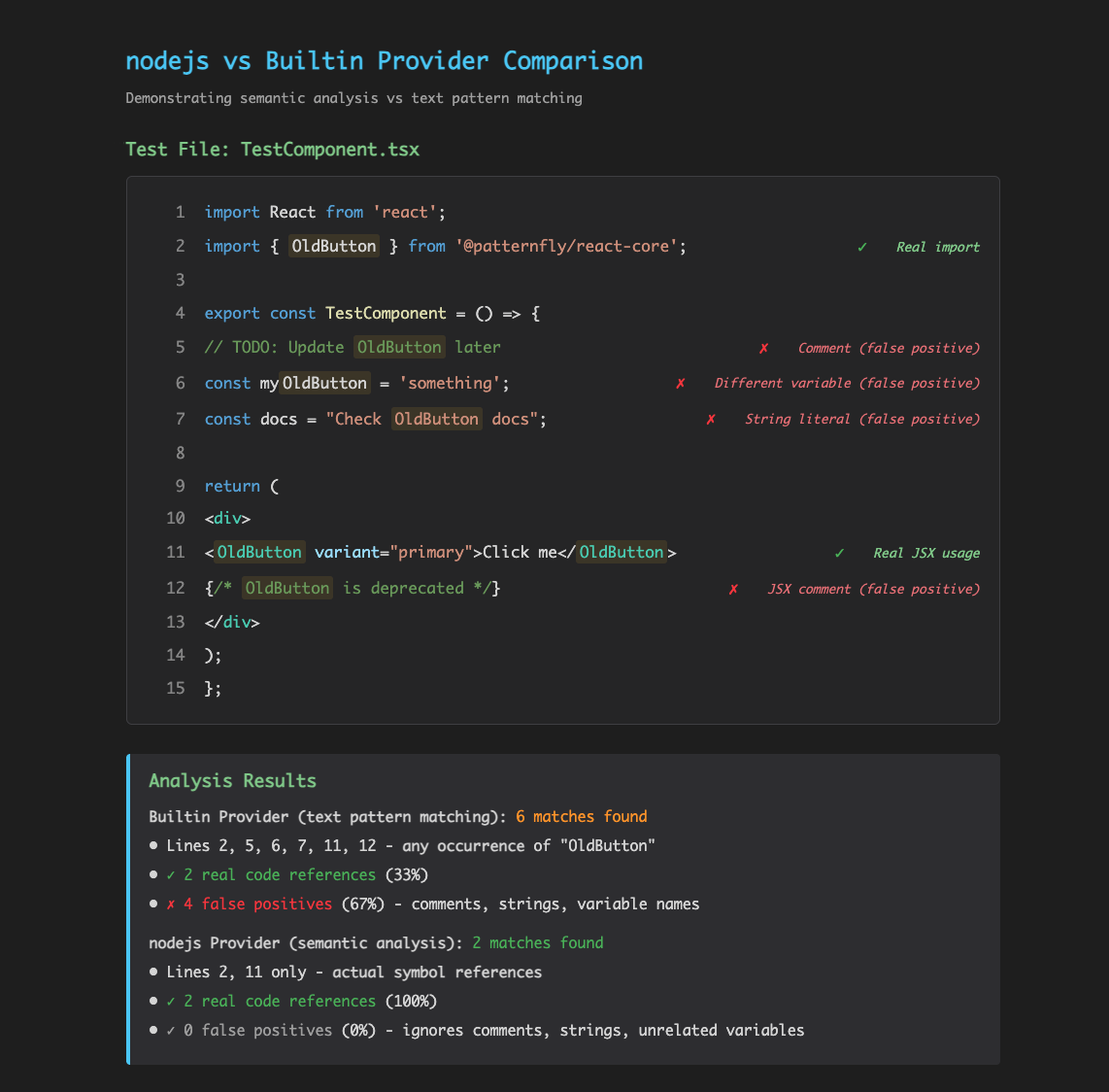
With 20% false positives:
- 1,600 violations → 320 are wrong
- AI generates fixes for all 1,600
- 320 bad fixes applied automatically
- Hours of debugging or bugs in production
Bottom line: You can’t automate fixes reliably with low-quality input.
The Solution: nodejs Provider
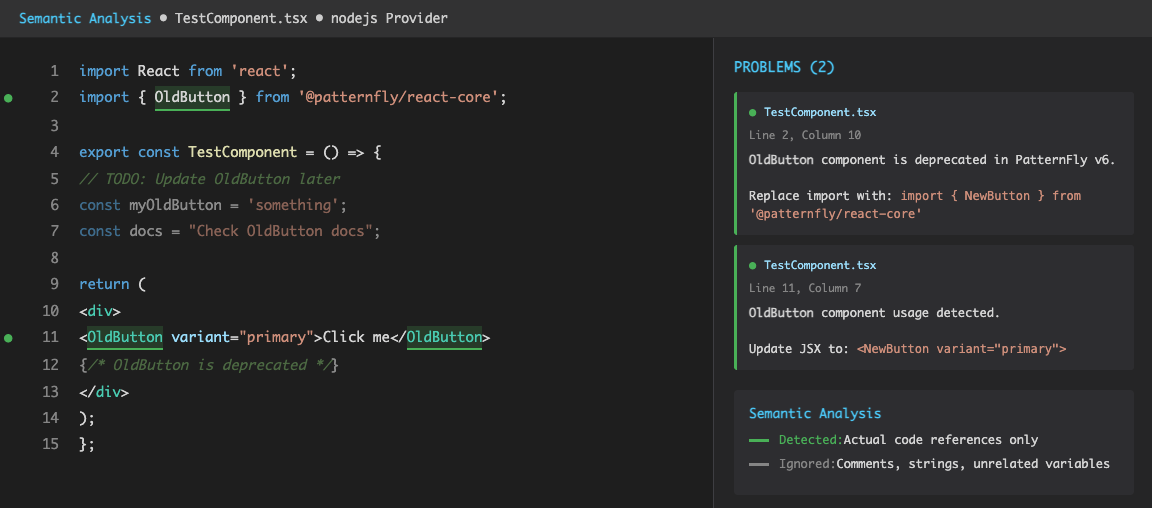
The nodejs provider integrates the TypeScript Language Server to perform semantic analysis. It understands code structure and only matches actual symbol references.
Same rule with nodejs provider:
# nodejs provider - semantic analysis
when:
  nodejs.referenced:
    pattern: "OldButton"
This only matches actual code references to the OldButton symbol, ignoring comments, strings, and unrelated variables.
Key differences:
| Aspect | Builtin Provider | nodejs Provider |
|---|---|---|
| How it works | Text pattern matching | Semantic analysis via TypeScript LSP |
| Accuracy | 80-85% | ~95% |
| False positives | 15-20% | ~5% |
| What it finds | Any text match | Actual symbol references only |
| Ignores | Nothing | Comments, strings, unrelated variables |
| Best for | CSS, config files, patterns nodejs can’t find | Components, functions, imports, JSX |
Real-World Validation: Ready for AI Assistance?
I validated semantic analysis against tackle2-ui - Konveyor’s production application with 66,000+ lines and 565 TypeScript files.
Results Comparison:
| Metric | Text Matching (Part 1) | Semantic Analysis (Part 2) | Impact on AI Assistance |
|---|---|---|---|
| Total Violations | ~1,600 | 1,324 | More focused scope |
| False Positives | ~20% (320) | ~5% (66) | 75% fewer bad suggestions |
| Comments/Strings | Flagged ❌ | Ignored ✅ | AI won’t change docs |
| Violation Quality | Mixed | High precision | AI can trust location |
| Ready for AI? | ⚠️ Risky | ✅ Yes | 95% suggestion confidence |
Violations by Rule:
| Pattern | Count | Rule Type | AI Assistance Quality |
|---|---|---|---|
Text component → Content |
886 | nodejs.referenced | ✅ All genuine code refs |
EmptyState refactoring |
200 | nodejs.referenced | ✅ Precise locations |
CSS class prefix (pf-v5- → pf-v6-) |
172 | builtin.filecontent | ✅ Pattern-based (safe) |
| CSS variable prefix updates | 45 | builtin.filecontent | ✅ Pattern-based (safe) |
| React token syntax changes | 21 | builtin.filecontent | ✅ Pattern-based (safe) |
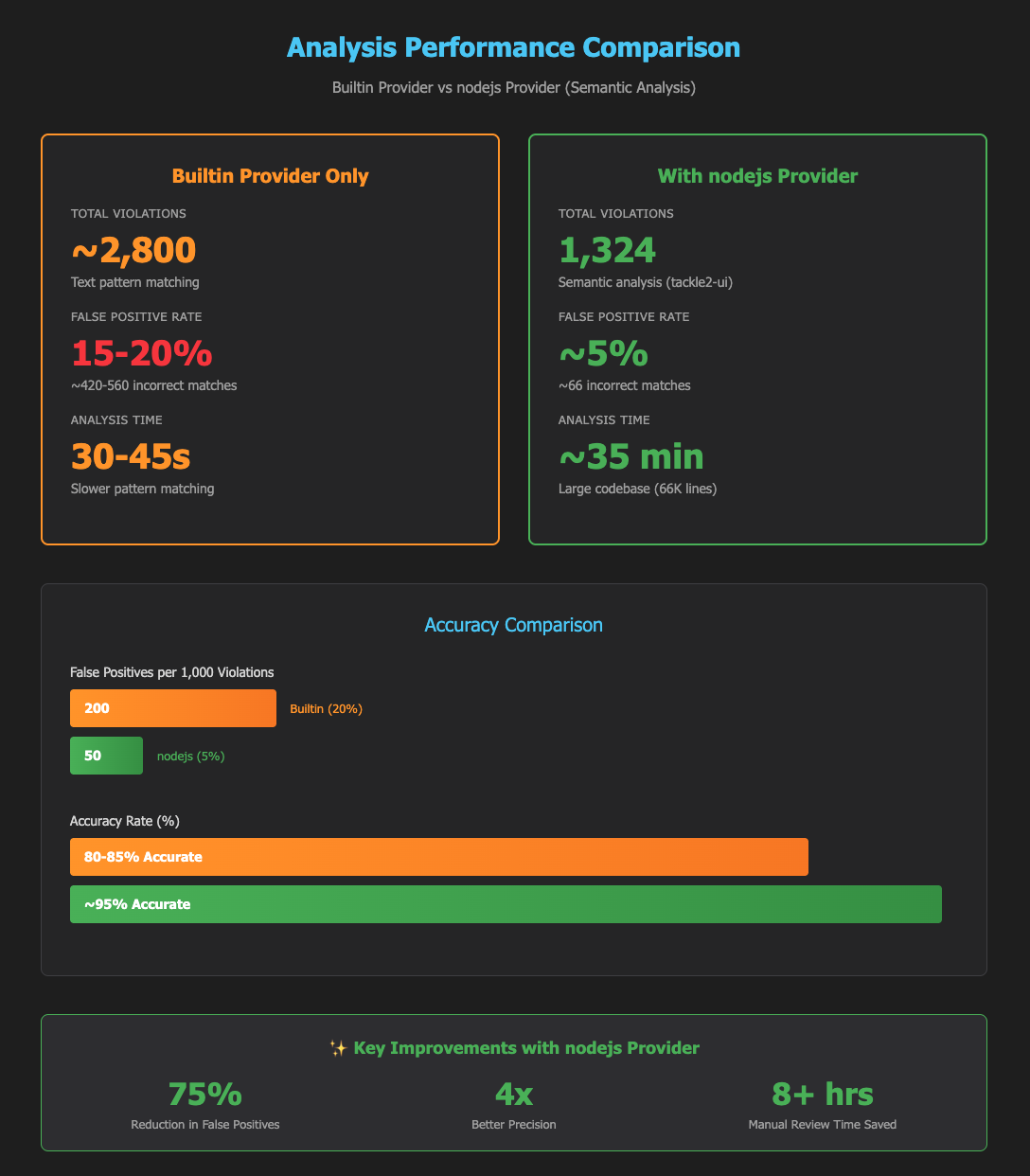
Key Insights:
-
High Precision Enables AI Assistance: The 886
Textcomponent violations are all genuine code references - exactly what AI needs. - The Math on False Positives:
- Text matching: 320 false positives × 2 min = 10.6 hours wasted
- Semantic analysis: 66 false positives × 2 min = 2.2 hours
- Time saved: 8.4 hours (and AI won’t waste tokens on bad violations)
- Ready for Part 3: Each violation includes precise file location, before/after examples, and 95%+ confidence - perfect input for AI-assisted refactoring.
Try It in 5 Minutes
No need to generate rules yourself - I’ve created a production-validated ruleset ready to use:
# Download the ruleset (with nodejs provider)
curl -O https://raw.githubusercontent.com/tsanders-rh/analyzer-rule-generator/main/examples/rulesets/patternfly-v5-to-v6/patternfly-v5-to-v6.yaml

# Run analysis with kantra (handles provider setup automatically)
kantra analyze \
  --input /path/to/your-patternfly-app \
  --rules patternfly-v5-to-v6.yaml \
  --output ./analysis-results
What you get:
- Same 10 rules, but with semantic analysis for higher accuracy
- False positives reduced from ~20% to ~5%
- High-quality violations ready for AI-assisted refactoring in Part 3
- Already validated on tackle2-ui (66K lines, 1,324 violations)
What the nodejs Provider Can and Can’t Find
✅ Finds (top-level symbols):
- Functions, classes, variables, constants
- Imports and exports
- JSX component usage
- Actual symbol references only
❌ Can’t find (use builtin provider):
- Methods inside classes
- Object properties
- Type annotations
- JSX props
- CSS patterns
Why this matters: Both providers can find top-level symbols, but nodejs provider is 3-4x more accurate because it understands code semantically instead of just matching text patterns.
Combining Both Providers: Best of Both Worlds
The most effective strategy uses both providers together:
# nodejs provider - finds component imports and usage (high precision)
- ruleID: old-button-component
  when:
    nodejs.referenced:
      pattern: "OldButton"
  message: |
    OldButton component is deprecated in PatternFly v6.
    Replace with NewButton component.

# Builtin provider - finds prop usage nodejs can't detect
- ruleID: old-button-variant-prop
  when:
    builtin.filecontent:
      pattern: '<OldButton\s+variant="danger"'
      filePattern: "*.{tsx,jsx}"
  message: |
    The "danger" variant has been renamed to "destructive" in v6.
Decision tree:
- Use nodejs.referenced for: Components, functions, imports from libraries
- Use builtin.filecontent for: CSS patterns, props, methods, type annotations
How the AI Generator Chooses Providers
The analyzer-rule-generator automatically selects the best provider:
python scripts/generate_rules.py \
  --guide https://www.patternfly.org/get-started/upgrade/ \
  --source patternfly-5 \
  --target patternfly-6

✓ Generated 10 rules
  - 4 using nodejs.referenced (component migrations: Chip, Tile, Text, EmptyState)
  - 6 using builtin.filecontent (CSS patterns, import paths, props, token syntax)
nodejs provider doesn’t increase the number of rules - it improves the quality of results. Same rules, better accuracy.
Setup: Zero Configuration Required
For end users (recommended):
Most users don’t need manual setup. Use kantra, which handles everything automatically:
kantra analyze \
  --input /path/to/your-app \
  --rules patternfly-v5-to-v6.yaml \
  --output ./analysis-results
kantra automatically:
- Detects TypeScript/JavaScript files
- Pulls provider containers (includes nodejs support)
- Starts providers in a pod
- Runs analysis and generates output
Prerequisites: Podman 4+ or Docker 24+ (that’s it!)
For advanced users: Manual setup with konveyor-analyzer - see advanced guide
Conclusion: Setting Up for AI-Assisted Migration
This three-part series builds toward AI-assisted migrations:
Part 1 - Generate Rules:
- ✅ AI extracts patterns from migration guides
- ✅ Generates Konveyor Analyzer rules automatically
- ⚠️ Text matching produces 15-20% false positives
Part 2 - Improve Accuracy (this post):
- ✅ Semantic analysis reduces false positives to ~5%
- ✅ Validated on tackle2-ui (66K lines, 1,324 high-quality violations)
- ✅ Production-ready ruleset available
- ✅ Violations are now AI-ready
Part 3 - AI-Assisted Fixes (coming soon):
- 🔜 Use Konveyor AI IDE extension to assist with refactoring
- 🔜 Leverage the 95% accuracy from semantic analysis
- 🔜 Significantly reduce manual refactoring time
- 🔜 Complete the AI-assisted migration workflow
Why this progression matters: You can’t apply AI-assisted fixes reliably with 20% false positives. The accuracy improvements in Part 2 enable effective AI assistance in Part 3.
Coming in Part 3: AI-Assisted Refactoring
Now that we have 1,324 high-precision violations from tackle2-ui, the next post shows how to use Konveyor AI to assist with refactoring them:
What I’ll cover:
- Using Konveyor AI IDE extension to fix violations interactively
- Feeding semantic violations to Konveyor AI for better context
- Generating fixes for the 886
Text→Contentcomponent changes - Measuring the time savings (spoiler: it’s substantial)
The goal: Turn 40+ hours of manual refactoring into focused, AI-assisted fixes within your IDE.
Example from tackle2-ui:
// Before (1 of 886 violations detected)
import { Text } from '@patternfly/react-core';
<Text component="h2">My Heading</Text>

// After (AI-generated fix with 95% confidence)
import { Content } from '@patternfly/react-core';
<Content component="h2">My Heading</Content>
Multiply this by 886 instances, and you see why accuracy matters.
Next Steps
For PatternFly teams:
- Try the ruleset: Download and run it on your codebase today
curl -O https://raw.githubusercontent.com/tsanders-rh/analyzer-rule-generator/main/examples/rulesets/patternfly-v5-to-v6/patternfly-v5-to-v6.yaml kantra analyze --input . --rules patternfly-v5-to-v6.yaml - Share your results: How many violations? AI assistance effectiveness? Help improve the tools.
For other migrations:
- Generate rules for your framework using the analyzer-rule-generator
- Follow the three-part process: Generate → Detect → AI-Assist
- Share your rulesets with the community
Resources
This Series:
- Part 1: Automating Large-Scale UI Migrations with AI-Generated Analyzer Rules
- Part 2: Improving Detection with Semantic Analysis (this post)
- Part 3: Automating Fixes with Konveyor AI (coming soon)
Tools:
- PatternFly v5→v6 Ruleset - Production-validated
- Analyzer Rule Generator - Generate custom rules
- Konveyor Analyzer - Static code analysis
- nodejs Provider PR - Semantic analysis
Have questions or want to share your migration results? Open an issue on the analyzer-rule-generator repo.